Introduction
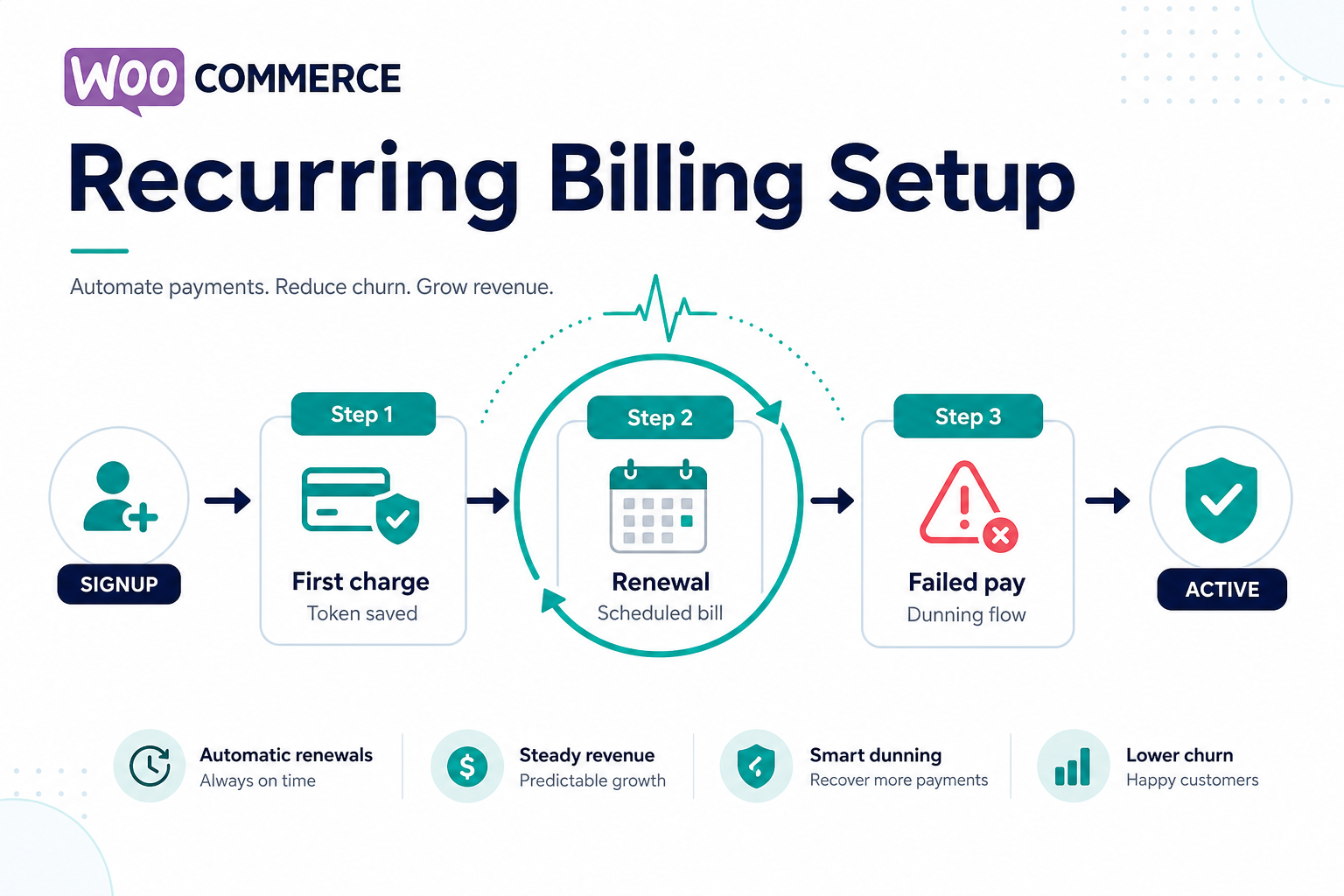
One-time checkout and recurring billing are different animals. A gateway that works for simple sales may still fail renewals if tokenization, retry rules, and webhooks for failed payments are not aligned with your subscription engine.
This article assumes you use—or plan to use—WooCommerce Subscriptions or a comparable recurring engine. Always confirm compatibility between your subscription plugin, your gateway plugin, and your processor’s recurring APIs.
Browse gateway extensions in our WooCommerce category and read plugin vs custom integration if your model is non-standard (e.g. marketplace splits).
Reality check: “Compatible with WooCommerce Subscriptions” on a gateway listing is not enough. You need a triangle of compatibility: Subscriptions extension + gateway plugin + processor recurring APIs. Weak links show up first on renewal day, not on the first checkout.
Table of contents
- Tokenization and saved payment methods
- Retry logic and dunning
- Upgrades, proration, and plan changes
- International renewals
- When to choose custom work
- Before you buy: subscription gateway purchase checklist
- FAQ
1. Tokenization and “saved payment method”
Recurring charges usually require a token or reference stored at the processor—not raw card data on your server. Ask:
- Does the gateway plugin implement the processor’s billing agreement or stored credential flow correctly?
- What happens when a card expires—does the customer get a self-service update path?
2. Retry logic and dunning
Failed renewals are normal (expired cards, insufficient funds). Your stack needs:
- Clear retry schedule (plugin + gateway capabilities)
- Customer emails that match your brand
- Order/subscription status rules your team understands
Link this operational layer to handling failed transactions and webhook monitoring.
3. Amount changes, upgrades, and proration
If you offer plan changes mid-cycle, confirm whether the gateway supports prorated charges or separate line items. Mismatches here show up as finance tickets, not front-end errors.
Customer experience: Self-service upgrades/downgrades should map to predictable gateway behavior—avoid “silent” partial captures that support cannot explain. Document the finance source of truth for subscription totals (chargebacks vs refunds when disputes arise on renewals).
4. International renewals
Cross-border recurring may hit additional authentication or local rules. Align currency presentation with settlement reality—see international payments and currency on WooCommerce.
5. When to choose custom work
Marketplaces, split payouts, or usage-based billing often exceed standard plugins. That is when custom payment gateway integration is appropriate—document subscription state ownership up front.
6. Before you buy: subscription gateway purchase checklist
Use this when you are ready to purchase a gateway plugin or switch processors:
- [ ] Processor supports recurring mandates the way you sell (weekly vs monthly, trials, coupons).
- [ ] Gateway plugin explicitly documents Subscriptions compatibility—not generic WooCommerce compatibility.
- [ ] Webhooks cover failed renewal and dispute signals you need for operations (webhook monitoring).
- [ ] Sandbox can simulate renewal or the gateway provides renewal simulation tools.
- [ ] You understand support renewal / license terms for the plugin—recurring revenue stores should not run abandoned payment code.
For a broader buying framework, see buying a payment gateway plugin for WordPress.
FAQ
Will any WooCommerce gateway plugin handle subscriptions?
No—check explicit compatibility among Subscriptions, gateway, and processor.
What about free trials?
Trials still need a valid mandate for future charges—implementation varies by processor.
What should we monitor after launch?
Renewal success rate, webhook errors around rebills, and dunning email delivery. Tie monitoring to webhook monitoring for WooCommerce and your CRM or email logs—not only WooCommerce admin.
Should we pay for installation help?
If renewals are core revenue and your team has not shipped live subscriptions before, consider when to buy plugin installation support.
Key takeaways
- Subscriptions require token lifecycle + retry + gateway alignment—test renewals, not only first checkout.
- International renewals amplify FX and authentication constraints—see international payments.
- Purchase decisions should include support renewals and webhook observability, not only license price.