Handling Failed Transactions Gracefully in WooCommerce: Key Strategies
- Handling Failed Transactions Gracefully in WooCommerce: Key Strategies
- Common Causes of Payment Failures in WooCommerce and How to Detect Them
- How to Communicate Transaction Failures Clearly to Customers
- Utilizing WooCommerce Plugins to Manage and Recover Failed Transactions
- Best Practices for Minimizing Failed Transactions and Enhancing User Experience
Understanding the Impact of Failed Transactions on Your WooCommerce Store
Encountering failed transactions can be frustrating for both store owners and customers. When a payment doesn’t go through, it can lead to confusion, lost sales, and damage to your store’s reputation. That’s why handling failed transactions gracefully is essential for maintaining customer trust and ensuring smooth operations. WooCommerce store owners who proactively manage these situations not only minimize friction but also create positive experiences that encourage customers to try again or reach out for help.
Common Causes of Failed Transactions in WooCommerce
Before addressing how to manage failed transactions, it’s important to understand why they happen. Here are some typical reasons:
- Payment Gateway Errors: Technical issues or downtime with payment processors such as PayPal, Stripe, or other gateways.
- Insufficient Funds: Customers may not have enough balance in their bank accounts or credit limits.
- Incorrect Payment Details: Customers might enter invalid credit card numbers, expiration dates, or CVV codes.
- Fraud Prevention Measures: Transactions flagged by fraud detection systems may be automatically declined.
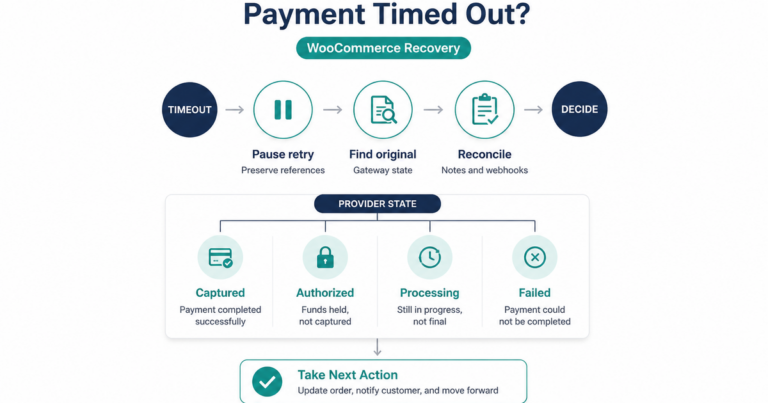
- Timeouts: Slow internet connection or session expiration can cause transactions to fail before completion.
Knowing these causes helps in tailoring appropriate responses to each scenario and minimizing abandoned carts.
Setting Up Clear and Friendly Error Messaging
When a transaction fails, clear communication with the customer is crucial. Generic error messages like “Transaction Failed” without explanation can leave customers puzzled and frustrated. Instead, your WooCommerce store should provide specific, easy-to-understand messages that guide the customer toward action.
- Explain why the transaction did not succeed, if possible (e.g., “Payment was declined due to insufficient funds”).
- Offer clear next steps, such as verifying payment details, trying a different payment method, or contacting customer support.
- Keep the tone polite and reassuring to reduce anxiety or disappointment.
Implementing detailed error messages builds customer confidence and encourages them to complete their purchase rather than abandoning the cart.
Automating Notifications to Keep Customers Informed
Communication shouldn’t stop at the error message on the payment page. Automatic emails triggered by failed transactions can notify customers of the issue and provide helpful guidance without requiring them to reach out first.
- Send a timely email explaining the failure with a link to retry the payment.
- Include tips on how to fix common issues, such as verifying card details or switching payment methods.
- Provide clear contact information in case the customer needs additional support.
WooCommerce plugins and extensions can be configured to send these personalized emails automatically, helping reduce the workload on your support team while enhancing customer experience.
Allowing Easy Retry and Alternative Payment Options
One of the best ways to manage failed payments is to give customers the ability to retry quickly and conveniently. Here’s how you can make this work for your WooCommerce store:
- Retry Button: Show a prominent “Retry Payment” button on the order or thank-you page that takes customers directly back to the payment screen.
- Save Payment Details Securely: Enable tokenization with your payment gateways so customers don’t have to re-enter details every time.
- Multiple Payment Methods: Offer alternative options such as credit cards, PayPal, bank transfers, or digital wallets to reduce the chance of failure.
Making retrying straightforward and convenient significantly improves the odds of recovering sales lost due to payment failure.
Checking Orders and Managing Failed Payments from the Backend
Behind the scenes, it’s essential to monitor and manage failed transactions carefully using your WooCommerce dashboard. Here are some tips for store owners:
- Regularly review orders with failed payment status to identify patterns or gateway issues.
- Reach out proactively to customers with unresolved failed payments, offering assistance or alternative solutions.
- Use WooCommerce order notes to document communication and troubleshooting efforts.
Having a clear process for dealing with failed payments ensures no customer is left unsupported and decreases the risk of negative reviews or lost business.
Improving Payment Success Rates with Preventive Measures
Beyond reactive handling, taking preventive actions can reduce the frequency of failed transactions. Consider these strategies:
- Enable payment gateway test modes to detect integration issues before going live.
- Ensure SSL certificates and security protocols are fully functional to build trust and enable smooth payment processing.
- Optimize checkout pages for speed and simplicity, minimizing the chances of timeouts or errors.
- Provide clear instructions on acceptable payment methods and common mistakes to avoid.
Preventing failures before they happen not only boosts your conversion rates but also creates a frictionless shopping experience.
Using Analytics to Understand and Address Payment Issues
Utilize WooCommerce reports and analytics tools to gain deeper insights into payment failures. Tracking metrics such as failure rates, common error types, and affected payment methods can guide you to focus your improvements effectively.
- Identify whether specific payment gateways need optimization or replacement.
- Discover if certain customer segments are facing more issues than others.
- Test incremental changes to checkout flow and monitor the impact on transaction success.
Data-driven decisions help refine your payment process, making your WooCommerce store more reliable and customer-friendly over time.
By treating failed transactions thoughtfully—from providing clear messages and automating customer notifications to offering easy retries and optimizing payment gateways—you create a seamless experience that keeps shoppers engaged and reduces revenue loss. Handling these situations with care shows your customers that their convenience matters, turning a potential roadblock into an opportunity to strengthen your brand.
Common Causes of Payment Failures in WooCommerce and How to Detect Them
Understanding the Key Factors Behind Payment Failures in WooCommerce
When running an online store with WooCommerce, encountering payment failures can be a common but frustrating experience for both merchants and customers. Identifying the root causes of these failures is crucial to maintaining a smooth shopping experience and protecting your revenue. Payment failures typically happen due to a mix of technical, user-related, and external factors.
One common cause is incorrect payment details entered by customers. Simple mistakes like typos in card numbers, expiration dates, or CVV codes can lead to declined transactions. Since payment processors perform strict validations, any mismatch results in failure before the payment gateway attempts authorization.
Another frequent culprit stems from insufficient funds or credit card limits. Even when the payment details are correct, the customer’s bank may reject the transaction because the account lacks the required balance or the transaction exceeds the card’s pre-set limit. This type of failure is typically communicated through error messages such as “insufficient funds” or “card limit exceeded.”
Technical glitches between WooCommerce and the payment gateway also contribute to payment failures. These issues can include API errors, server downtime, or timeout problems during communication. When the payment gateway is temporarily unavailable or slow to respond, the transaction might never complete successfully.
Fraud prevention mechanisms play a significant role in payment failure rates. Payment gateways and banks often have built-in fraud detection algorithms that monitor unusual activity. If a transaction triggers suspicion, it may be automatically declined to protect both the customer and merchant from potential fraud.
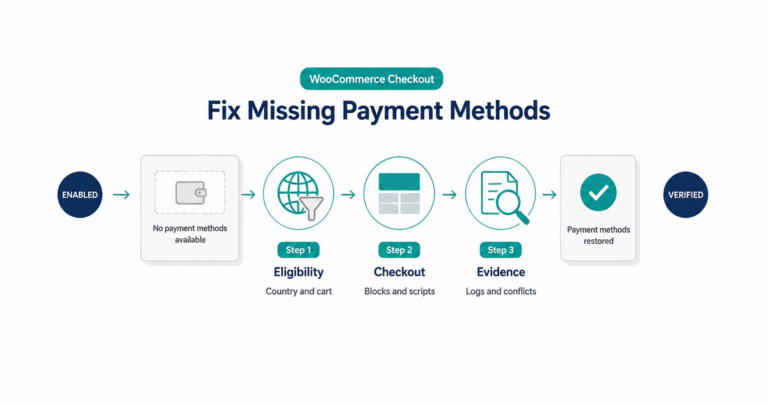
Currency and region restrictions sometimes lead to failed payments, especially if the payment method or card used is not supported in the customer’s location or for the selected currency. Ensuring your WooCommerce store is configured to accept payments in all intended territories and currencies can help reduce these errors.
How to Detect Payment Failures Effectively
Detecting payment failures swiftly and accurately requires leveraging WooCommerce’s native tools alongside third-party integrations. WooCommerce offers detailed reports and logs that help you pinpoint when and why a transaction didn’t go through.
One of the first steps is to enable logging for your payment gateways in WooCommerce. These logs record every transaction attempt and response from the payment provider, granting you a detailed view of failure causes. Accessing these logs can reveal error codes or messages that your payment processor sends back, such as card declines, expired cards, or gateway errors.
Utilizing real-time notification systems is another essential approach. Many payment gateways support webhooks that notify your system instantly when a payment is declined or fails. Setting up these webhooks allows you to trigger automated actions like alerting your support team or informing the customer immediately.
Monitoring failed transactions directly from your WooCommerce dashboard can also help. The "Orders" section of WooCommerce lists all orders, including those marked as “Failed” or “Pending.” Filtering orders by status enables quick identification of transactions that require further attention or follow-up.
For stores processing numerous payments, integrating third-party analytics or customer relationship management (CRM) tools can simplify detection. These platforms can aggregate failure data, detect patterns over time, and offer advanced filtering options to identify recurring issues linked to specific payment methods or customer regions.
Practical Tips to Improve Failure Detection
- Regularly check WooCommerce payment logs: Review logs at least weekly to catch hidden issues early.
- Set up custom alerts: Use plugins or webhook notifications to receive instant updates when payments fail.
- Encourage customers to provide clear payment details: Enhance the checkout form guidance to reduce input errors.
- Test your payment gateway integration: Periodically run test transactions to ensure your payment provider and WooCommerce communicate flawlessly.
- Track error codes: Maintain a reference of common error codes from your payment gateway and interpret these promptly.
Addressing User Experience After Payment Failure
Detecting a failure is only part of managing the issue effectively. How you communicate payment errors to customers can make a big difference in converting a failed transaction into a successful sale later. Clear, user-friendly error messages that identify the reason for failure help customers understand the problem and correct it quickly.
WooCommerce allows customization of payment failure messages through plugins or theme edits. Providing specific instructions, such as double-checking card details or contacting their bank, improves user confidence. Avoid vague messages that frustrate users or leave them guessing what went wrong.
Additionally, offer easy options for customers to retry payments without re-entering all their information. This reduces friction and encourages completion. Automated follow-up emails triggered by failed payment transactions can remind customers to update their payment information or try again.
Optimizing Payment Success Through Better Detection
A proactive approach in detecting and understanding the causes behind payment failures sets your WooCommerce store up for success. By harnessing detailed logs, real-time notifications, and analytical tools, you gain insights that allow corrective measures to reduce failure rates.
Addressing common causes like data entry errors, technical issues, and fraud flags helps streamline the payment process. Moreover, providing a transparent and supportive experience for customers after failures encourages loyalty and repeat business.
In essence, improving your detection capabilities combined with thoughtful communication builds a resilient payment system. This not only lowers abandoned cart rates but also strengthens your reputation as a trustworthy eCommerce brand.
How to Communicate Transaction Failures Clearly to Customers
Crafting Clear and Compassionate Messages for Customers
When a transaction fails during the checkout process, the way you communicate with your customers can make all the difference. Clear communication helps ease frustration, maintains trust, and encourages users to try again or reach out for support rather than abandoning the purchase. Always ensure your messages are direct yet empathetic, avoiding technical jargon that may confuse or alienate your customers.
Instead of vague alerts like “Transaction Failed,” specify the issue in a straightforward way. For example, “We couldn’t process your payment because your card was declined.” If the failure is due to insufficient funds, expired cards, or connectivity issues, briefly state it so customers understand the reason. This transparency reassures them that the problem is on the payment side, not with their order or your store.
Providing Actionable Next Steps
A transactional failure notice should never leave customers guessing what to do next. After informing them about the issue, guide them clearly on how to resolve it. This reduces drop-off rates and improves the chances of completing the sale. Consider including:
- Retry options: A prominent button to “Try Payment Again” enables the user to quickly retry without starting over.
- Alternative payment methods: Suggest other ways to pay, like different credit cards, PayPal, or direct bank transfers.
- Contact support: Offer easy access to customer service through live chat, email, or a phone number for personalized help.
Make these steps visible right on the failure page or popup to keep customers engaged and prevent confusion.
Using Friendly and Reassuring Language
No one likes to see their payment fail, but tone can soften the blow. Use conversational, positive language that shows you want to help, not blame. Phrases like, “Oops! Something went wrong with your payment. Let’s fix it together!” help create a collaborative atmosphere.
Avoid language that feels sterile or alarming, such as “Error” or “Failure” without context. Instead, include words that reduce anxiety and increase confidence in resolving the issue. Let your customers know that running into this problem is common and easily fixable.
Designing Visually Clear Notifications
How the failure message looks also impacts how well customers understand it. Use colors and design elements thoughtfully:
- Use red or orange highlights to signal an error but avoid harsh or aggressive tones that create panic.
- Include icons such as warning signs or payment symbols to quickly convey the issue visually.
- Keep the message concise and easy to scan so customers can immediately grasp the problem without reading dense paragraphs.
Ensure the notification is prominent but doesn’t disrupt the user experience or make the page feel cluttered.
Personalizing Communication When Possible
Adding a personal touch goes a long way in eCommerce. If your system detects the customer’s name or account details, incorporate these into the message to make it feel more tailored. For example:
“Hi Sarah, your recent payment didn’t go through. Please check your card details or try another method.”
Personalization increases trust and shows that you care about the individual’s experience rather than treating them as just another transaction.
Automating Follow-Ups and Notifications
Sometimes customers abandon their cart after a failed payment because they didn’t notice the error or forgot to retry. Implementing automated emails or SMS alerts reminding customers about the failed transaction can recover lost sales.
These follow-ups should:
- Be timely—sent within a few hours of the failed attempt
- Restate the problem clearly
- Offer simple instructions or links to complete their purchase
- Include support contact details for further assistance
Such automation turns a frustrating experience into a helpful nudge encouraging completion.
Empowering Customers with Self-Service Tools
Encourage your customers to manage failed transactions on their own by providing clear portals or dashboards within your WooCommerce store. Here, they can:
- Review recent orders and payment history
- Update payment details securely
- Retry payments without having to re-enter cart information
When users feel in control, transaction failures feel less intimidating, and they’re more likely to resolve issues proactively.
Keeping Communication Consistent Across Platforms
Make sure that failure messages are consistent whether customers shop using desktop, mobile, or apps. Clear transaction failure communications should look and feel the same, and actionable steps should be easily accessible regardless of device. This consistency ensures customers understand the issue no matter where they engage with your store.
Mastering how to communicate failed transactions clearly helps you build rapport with customers beyond just making sales. When customers trust that your WooCommerce store will inform them honestly and helpfully, they feel more comfortable completing purchases even if hiccups occur. Clear, compassionate, and actionable messaging turns potential frustration into a smooth shopping experience, boosting your business reputation and customer loyalty.
Utilizing WooCommerce Plugins to Manage and Recover Failed Transactions
Enhancing WooCommerce with Plugins for Transaction Recovery
When running an online store using WooCommerce, managing payment processes smoothly is crucial for maintaining customer trust and maximizing sales. However, payment failures can happen for various reasons, such as network disruptions, expired cards, or user errors. Instead of letting these failed transactions cause customer frustration and lost revenue, you can utilize specialized WooCommerce plugins designed to manage and recover these issues efficiently.
Why Investing in Failed Transaction Management Matters
Payment failures are more than just a technical hiccup; they directly impact your bottom line and customer satisfaction. If a transaction fails and your platform doesn’t handle it well, customers might abandon their cart and never return. By addressing these issues promptly, you demonstrate reliability and professionalism, which boosts customer retention and encourages repeat purchases.
Features to Look for in Transaction Recovery Plugins
Not every plugin is created equal when it comes to handling failed transactions. To choose the right tool for your WooCommerce store, consider these essential features:
- Automated Retry System: The plugin should automatically retry failed payments after a set period. This feature helps recover transactions lost due to temporary issues.
- Customer Notifications: Sending automated, clear, and friendly alerts to customers about failed transactions keeps them informed and encourages action.
- Detailed Reporting: Insightful reports and dashboards help you track failed transactions and analyze trends for better decision-making.
- Integration with Payment Gateways: Compatibility with popular payment gateways ensures smooth operation and easier troubleshooting.
- Flexible Recovery Options: Options for customers to update payment methods or retry payment directly within the plugin improve the user experience.
Popular Plugins to Handle Failed Transactions in WooCommerce
Several high-quality plugins can help you manage failed payments effectively. Here are some examples with their standout features:
1. WooCommerce Recover Abandoned Cart
Although primarily designed to recover abandoned carts, this plugin also supports transaction recovery. It sends automated follow-up emails reminding customers to complete their purchases after failed transactions.
2. WooCommerce Subscriptions
For stores offering subscription-based products or services, WooCommerce Subscriptions includes built-in failed payment recovery tools. It automatically retries failed payments and notifies customers to update payment information.
3. AutomateWoo
AutomateWoo is a versatile automation plugin that can be configured to send reminders and retry failed transactions. It allows creating custom workflows, automating customer communication about payment issues.
4. Stripe Payment Gateway with Retry Support
Some payment gateways, like Stripe, come with native retry mechanisms. Combining the Stripe WooCommerce plugin with additional tools for notification ensures a smooth recovery process.
Best Practices for Using Plugins to Recover Failed Transactions
Simply installing a plugin isn’t enough. To make the most out of these tools, follow these best practices:
- Customize Communication: Personalize emails and notifications to sound helpful and encourage customers to complete payments rather than sounding robotic.
- Set Retry Intervals Wisely: Avoid bombarding customers by spacing out retry attempts and notifications appropriately.
- Provide Easy Access to Payment Updates: Ensure your recovery emails include direct links for customers to update their payment details without hassle.
- Monitor and Optimize: Use the plugin’s reporting features to continuously assess recovery rates and tweak your strategies as needed.
- Combine with Cart Recovery: Cross-apply abandoned cart and failed transaction recovery strategies for maximum effectiveness.
Improving User Experience While Handling Payment Failures
When customers encounter failed transactions, your approach can either build loyalty or cause abandonment. Plugins optimized for WooCommerce let you communicate transparently and offer solutions instead of leaving customers in the dark. Simple user flows that guide customers to update payment methods, retry automatically, or contact support reduce friction.
Moreover, you can enhance trust by displaying secure payment badges, reassuring shoppers about their data protection when reattempting the checkout process. The smoother and more informed the experience, the more likely your customers will return.
Balancing Automation and Personal Touch
Although automation improves efficiency, it’s important to balance it with human interaction. Some customers prefer speaking directly to support when problems arise with their payment. Selecting plugins that support easy integration with customer service platforms enables timely human intervention when the automated system flags complex issues.
Handling and recovering failed transactions in WooCommerce through plugins not only saves lost sales but also enhances customer satisfaction. By choosing the right tools and configuring them thoughtfully, you create a seamless experience that turns potential negatives into opportunities for engagement. Ultimately, managing failed transactions gracefully helps build a reputable and successful WooCommerce store that customers trust to shop from time and time again.
Best Practices for Minimizing Failed Transactions and Enhancing User Experience
Understanding the Impact of Transaction Failures
Every online store owner knows that a seamless checkout process is crucial for customer satisfaction and business growth. When transactions fail during payment, it creates frustration and often leads to abandoned carts. Minimizing these failed transactions is not just about reducing errors; it’s about enhancing the overall user experience. When customers encounter issues, they need clear guidance and reassurance that their order will still be handled professionally.
Common Causes of Failed Transactions in WooCommerce
Identifying why transactions fail helps you take proactive steps to prevent them. Here are the most frequent reasons:
- Incorrect payment details entered by the user.
- Expired or declined credit/debit cards.
- Network interruptions during checkout.
- Plugin conflicts or outdated WooCommerce payment gateways.
- Security measures like fraud detection blocking valid transactions.
Addressing these issues can significantly reduce the frequency of failed transactions.
Streamlining Payment Options and Gateway Performance
Offering multiple payment methods gives customers flexibility and reduces the chance of failure due to unsupported cards or accounts. Make sure to:
- Enable popular gateways such as Stripe, PayPal, and Apple Pay.
- Regularly update and test payment plugins to ensure compatibility.
- Set clear instructions or tooltips next to payment fields to reduce user errors.
- Implement fallback payment options if a primary gateway experiences downtime.
Enhancing User Experience with Clear Communication
When a transaction fails, customers shouldn’t guess what went wrong. Provide explicit error messages that help users understand the problem in simple terms. For example, instead of a generic “Transaction failed,” specify “Your card was declined; please try another payment method” or “Session timed out; please try again.” Clear communication boosts user confidence and reduces frustration.
Optimizing the Checkout Process
The checkout page should be simple and fast-loading to prevent users from abandoning their carts. Some best practices include:
- Minimizing the number of required form fields to reduce user effort.
- Ensuring mobile responsiveness for customers shopping on phones or tablets.
- Using progress indicators that show how many steps remain in the checkout.
- Auto-filling address fields where possible to speed up completion time.
Utilizing Transaction Logs and Reporting Tools
WooCommerce provides built-in transaction logs that store detailed information about each payment attempt. Regularly reviewing these logs helps pinpoint recurring errors or patterns causing failed transactions. Additionally, integrating third-party analytics can give deeper insights into payment behaviors and help you tailor solutions that fit your customers’ needs.
Implementing Retry Mechanisms and Notifications
Sometimes a failed transaction isn’t the end—technical glitches or timeouts can cause temporary failures. Implementing a retry mechanism allows customers to attempt payment again without re-entering details. Combine this with automated email alerts that notify customers of the failure and provide straightforward instructions to complete the purchase. This strategy recovers lost sales and maintains good customer relationships.
Leveraging Security Without Compromising Usability
Security is critical, but overzealous fraud prevention can mistakenly block legitimate transactions. To balance security with usability, consider:
- Using 3D Secure verification to protect payments while keeping the process smooth.
- Offering customer service channels, like live chat, for users facing payment difficulties.
- Setting up clear policies around declined transactions and disputes.
Regularly Training Staff and Updating Systems
Your team plays a key role in handling payment issues. Training customer service staff to assist users with failed transactions promptly creates trust. Also, keep WooCommerce and all payment-related plugins updated to avoid security vulnerabilities or compatibility problems. Well-maintained systems and knowledgeable personnel work hand-in-hand to keep payment flows smooth.
Final Thoughts on Payment Transaction Management
By focusing on reducing the causes of payment failure, simplifying the checkout, and maintaining clear communication, you enhance both the technical and emotional aspects of the customer journey. Every failed transaction avoided or handled gracefully means more completed sales and happier customers. Invest in these best practices within WooCommerce to create a checkout experience that keeps your store competitive and trusted.
Key Takeaway:
When handling failed transactions gracefully in WooCommerce, it’s essential to adopt a comprehensive approach that combines clear communication, smart technology use, and proactive strategies. Understanding the common causes of payment failures—such as network issues, incorrect payment details, or gateway errors—allows you to pinpoint where breakdowns occur. Detecting these issues early helps you respond quickly and minimize disruptions for your customers.
Communicating transaction failures clearly is just as important. When you let customers know exactly what went wrong in a simple, straightforward way, it reduces confusion and frustration. Providing clear instructions on what to do next encourages customers to retry or seek support, which can improve customer loyalty and reduce cart abandonment.
Leveraging WooCommerce plugins designed to manage and recover failed transactions adds another layer of effectiveness. Many tools offer automated retries, detailed reporting, and follow-up email notifications to help recover lost sales. These plugins not only save you time but also enhance the customer experience by making the process smoother and less stressful.
Following best practices to minimize failed transactions creates a positive shopping environment. This includes regularly updating payment gateways, ensuring website security, simplifying the checkout process, and offering multiple payment options. Together, these steps reduce the chance of payment failures and help maintain customer trust.
In short, handling failed transactions gracefully in WooCommerce means knowing why failures happen, communicating openly with customers, using the right tools to manage problem payments, and continuously optimizing your checkout experience. Doing all this will not only reduce revenue loss from abandoned orders but also build stronger relationships with your customers by showing that you care about solving problems efficiently and transparently.
Conclusion
Handling failed transactions gracefully in WooCommerce is essential for maintaining customer trust and ensuring a smooth shopping experience. By understanding the key strategies to address payment issues, you can turn frustrating moments into opportunities for customer satisfaction. Recognizing common causes of payment failures, such as connectivity issues or incorrect payment details, allows you to detect problems early and respond effectively.
Clear communication is vital when a transaction doesn’t go through. Informing your customers promptly and transparently helps reduce confusion and builds confidence in your store. Using the right WooCommerce plugins can automate much of this process, making it easier to manage failed payments and even recover lost sales by giving customers simple options to retry or use alternative payment methods.
To further reduce the chance of payment failures, follow best practices like regularly updating your payment gateways, optimizing your checkout process, and providing multiple payment options. These steps not only minimize errors but also create a seamless user experience that encourages repeat business.
By combining these approaches—from detection and communication to the smart use of plugins and continual improvements—you create a reliable payment environment for your WooCommerce store. This focus on handling failed transactions with care and professionalism boosts your credibility and ultimately supports your business growth.