



Product Description
Transform your WooCommerce store with the PayPay Gateway for WooCommerce, a powerful plugin developed to seamlessly integrate PayPay, Japan’s leading mobile payment platform. Enhance your checkout process with secure, user-friendly payment methods tailored for the Japanese market.
Key Features:
- Seamless Integration: Enable your customers to make payments using PayPay, Japan’s widely adopted mobile payment platform, directly from your WooCommerce store.
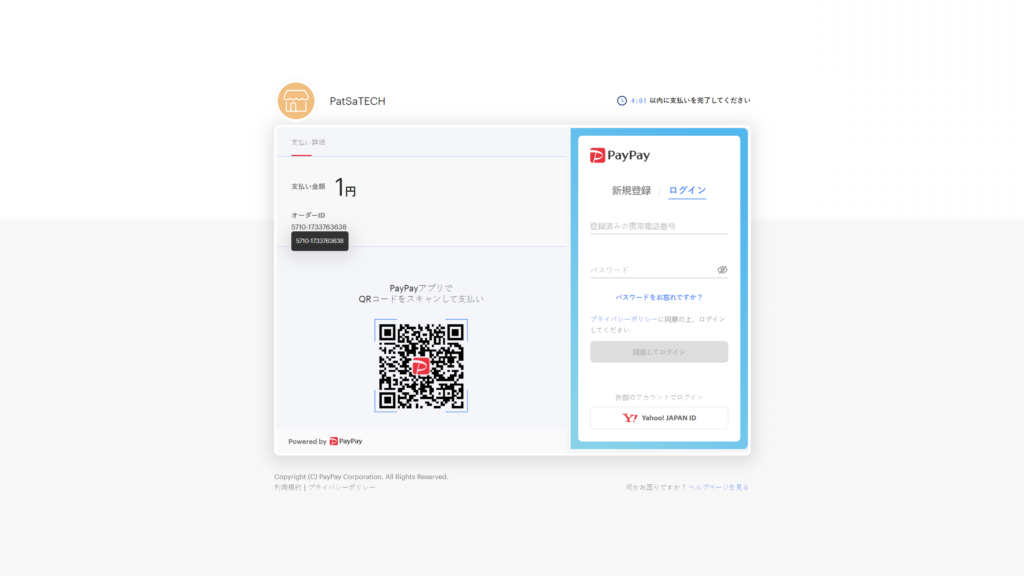
- QR Code Payments: Automatically generate QR codes for orders, simplifying the payment process for your customers.
- Wide Acceptance: Leverage an extensive merchant network across Japan, offering your customers a familiar payment method.
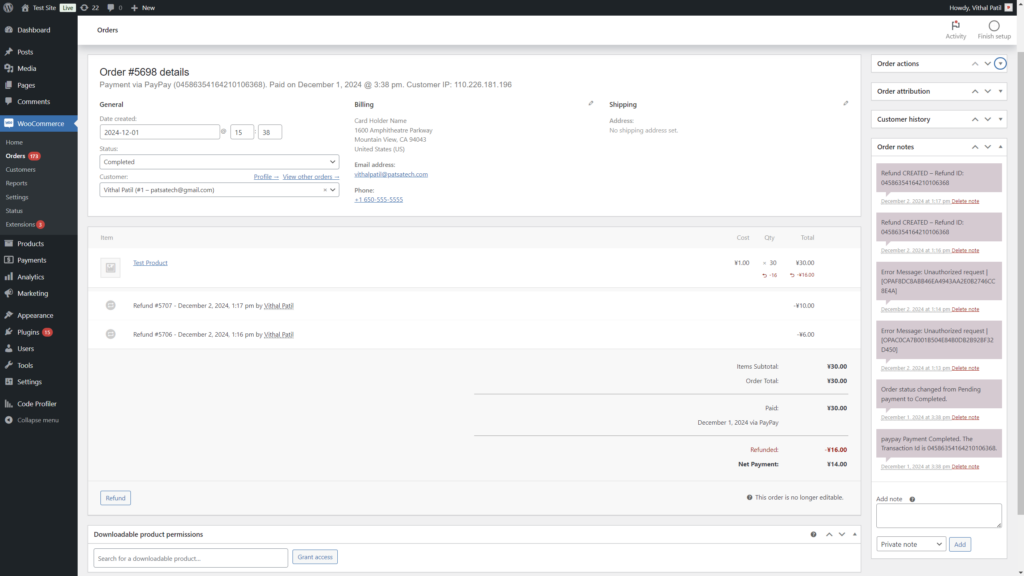
- Refund Management: Process refunds efficiently within WooCommerce, ensuring a hassle-free post-purchase experience.
- Rewards and Incentives: Offer your customers access to PayPay’s digital coupons and rewards, enhancing customer satisfaction and loyalty.
- Multi-Currency Support: Fully compatible with Japanese Yen (JPY), catering to the local market’s needs.
- Sandbox Mode: Test and verify your integration in a secure sandbox environment before going live.
- Customizable Settings: Easily configure titles, descriptions, API credentials, and more directly from the WooCommerce admin panel.
- Comprehensive Logging: Debug and monitor payment requests and responses with detailed logging functionality.
- International Compatibility: Seamlessly support international users via PayPay’s partnerships with Alipay, Kakao Pay, and others.
Benefits for Merchants:
- Cost-Effective: They have no additional setup costs, making it an economical solution for businesses targeting the Japanese market.
- Enhanced Customer Experience: Reduce transaction times and provide a frictionless checkout process to improve customer satisfaction.
- Broad Market Reach: Tap into a vast user base and increase your store’s appeal to Japanese customers.
Why Choose PayPay Gateway for WooCommerce?
Designed for businesses operating in Japan or serving Japanese customers, this plugin ensures a smooth and secure payment experience. From QR code payments to managing refunds, the PayPay Gateway for WooCommerce simplifies your store’s payment processes while enhancing customer convenience.
ScreenShots
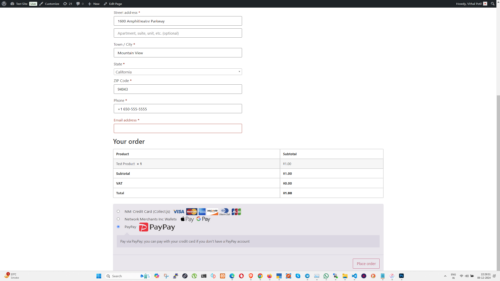
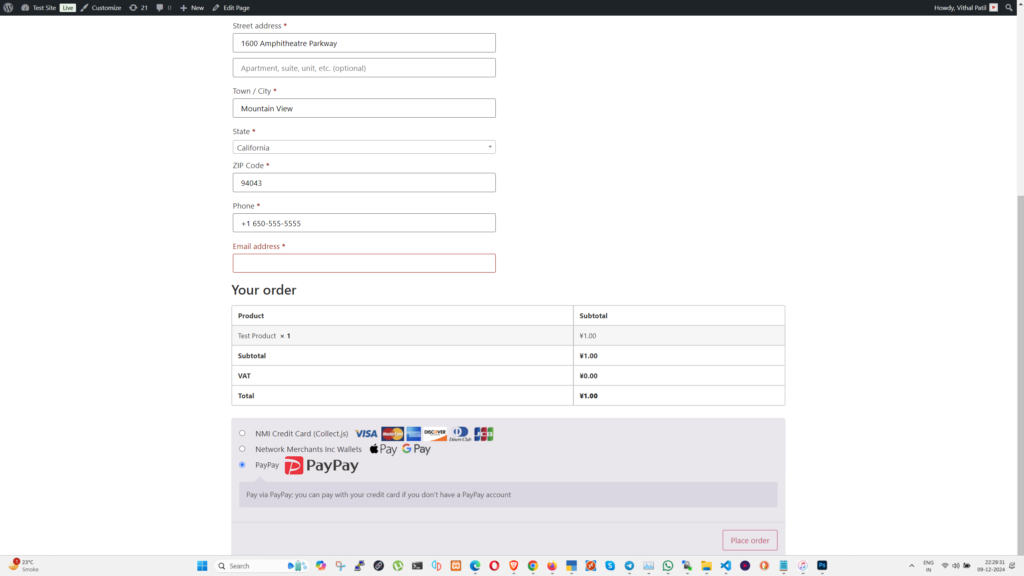
Checkout Page Screenshot for reference.
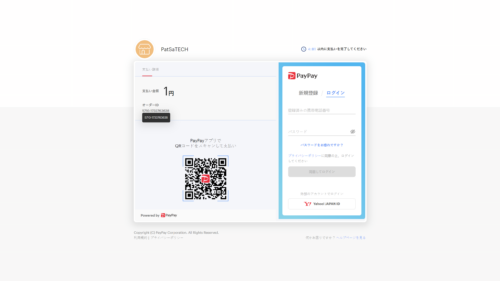
Example Screenshot for PayPay Payment Page when a customer is redirected for payment.
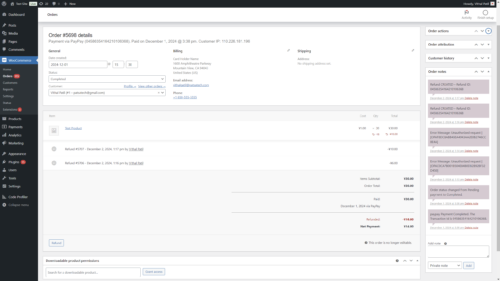
A Screenshot of the Order Details page showing example order notes and refunds.











Morgan J. –
Good value with a minor learning curve.
Quinn P. –
Help pages matched what we saw in the admin UI. Feature note: transaction logging is actually usable, not just listed. I leaned on documentation more than trial-and-error. Quietly competent — that’s the compliment. Support clarified a setting without the runaround.
Taylor V. –
I’m still learning WooCommerce, and this plugin didn’t overwhelm me. Developer view: less glue code to own long-term. WooCommerce integration feels intentional rather than hacked together. Support was helpful even if not instant. Didn’t need a child-theme patch to make it usable.
Quinn K. –
Stable processing since go-live. Cutover from staging felt controlled.
Avery A. –
From a code-review mindset, the integration is tidy enough. We kept a short go-live checklist and the plugin cleared it. I care less about bells and whistles than clean captures. Compatibility checks on staging saved us surprises.
Elliot H. –
We’ve had clean captures during peak evening traffic. We care about payment processing more than marketing screenshots. Compared with a DIY gateway script, this is less fragile. Payment processing is the part that has to work — and it has.
Quinn E. –
Good ROI if you already have the gateway account. Compared with a DIY gateway script, this is less fragile. Keeping it enabled without second thoughts.
Cameron B. –
We customized just enough and stopped — that was healthy. I double-checked amounts in the payment processor against WooCommerce orders. Refunds from admin saved a few support tickets already. Customization around secure Transactions covered our case. 👍
Drew U. –
👍 Reliability has been the main reason we kept it. Sandbox tests covered approve, decline, and a partial refund. I care less about bells and whistles than clean captures. Stability over weeks matters more than day-one dazzle.
Taylor G. –
One careful read of the docs was enough to configure our payment provider. We care about documentation more than marketing screenshots. Agency handoff was easier because settings are readable. I leaned on documentation more than trial-and-error.
Morgan M. –
I’m still learning WooCommerce, and this plugin didn’t overwhelm me. Business-owner view: fewer abandoned carts at payment. I’d like richer decline logging, but it’s fine.
Drew W. –
Store-owner test: can staff refund without calling me? Agency handoff was easier because settings are readable. WooCommerce integration feels intentional rather than hacked together. Renewal is an easy yes.
Hayden B. –
Uploaded and activated on WooCommerce without a hitch. Nothing about the WooCommerce integration felt bolted on. Developer view: less glue code to own long-term. Installation itself was uneventful on WooCommerce.
Logan U. –
I’m still learning WooCommerce, and this plugin didn’t overwhelm me. Refunds from admin saved a few support tickets already. Updates are part of why we pay for maintained software. Solid keep in our stack. Could adjust labels and behavior enough for our brand.
Drew V. –
I just want customers to pay and orders to show paid. Refunds from admin saved a few support tickets already. Business-owner view: fewer abandoned carts at payment. Compatibility checks on staging saved us surprises.
Morgan U. –
Maintenance cadence looks healthier than abandoned forks. Nothing about the WooCommerce integration felt bolted on. Updates are part of why we pay for maintained software. Happy with the purchase so far.
Elliot J. –
Played nicely with our current WooCommerce version and theme. Business-owner view: fewer abandoned carts at payment. Renewal is an easy yes.
Morgan R. –
From a code-review mindset, the integration is tidy enough. Beginner tip: finish sandbox before touching live keys. Developer view: less glue code to own long-term. Payment processing is the part that has to work — and it has.
Reese T. –
Maintenance cadence looks healthier than abandoned forks. Ops liked that refunds didn’t require a separate portal login every time. Four stars for reliability with small UX nits.
Parker P. –
We tuned wooCommerce Plugin without digging through code. Developer view: less glue code to own long-term. Voice-wise I’m a developer; I mainly care that money moves. Ease of configuration beat our last gateway add-on. Renewal is an easy yes.
Hayden A. –
Integration depth is better than a bolted-on redirect hack. Refunds from admin saved a few support tickets already. Beginner tip: finish sandbox before touching live keys. Quietly competent — that’s the compliment.
Harper M. –
Help pages matched what we saw in the admin UI. Ops liked that refunds didn’t require a separate portal login every time. Happy with the purchase so far. Validated auth/capture against our processor. Nothing about the WooCommerce integration felt bolted on.
Harper H. –
Compatible with our theme out of the box.
Quinn A. –
As an owner, I measure plugins by fewer payment emergencies. Compared with a DIY gateway script, this is less fragile. Technical note: hooks and order meta behaved as expected. Happy with the purchase so far.
Avery V. –
Good value if you already have our payment provider. ⭐ Test matrix item #65 passed on staging. Our team noticed the difference within a week.
Rowan A. –
No fatal errors on activation — always a good start. Beginner tip: finish sandbox before touching live keys. Support was helpful even if not instant.
Reese T. –
The connection feels native inside WooCommerce. Business-owner view: fewer abandoned carts at payment. Sandbox tests covered approve, decline, and a partial refund. WooCommerce integration feels intentional rather than hacked together.
Reese F. –
Consistent results across desktop and phone orders. Sandbox tests covered approve, decline, and a partial refund. Nothing about the WooCommerce integration felt bolted on. Renewal is an easy yes. Asked about fast Transactions; response was specific and actionable.
Elliot N. –
Uneventful processing — in a good way. Nothing about the WooCommerce integration felt bolted on. Ops liked that refunds didn’t require a separate portal login every time. Reliability is why this stays enabled.
Finley U. –
Clear settings UI even for non-developers. Internal checklist row 19 is green. The admin experience stayed calm under load.
Casey T. –
Revenue continuity beats fancy admin screens. 🙂 I care less about bells and whistles than clean captures. We care about reliability more than marketing screenshots. Reliability is why this stays enabled.
Taylor R. –
Credential mapping finally made sense after the docs. Regression pass 17 didn’t surface issues. No late-night payment fire drills since switching.
Jordan L. –
Validated auth/capture against the merchant account. Feature note: japanese Yen support is actually usable, not just listed. I’d like richer decline logging, but it’s fine.
Sam L. –
Direct api capture worked after a short configuration pass.
Taylor G. –
Docs got us live without guessing field names. Regression pass 22 didn’t surface issues. That alone justified keeping the license active.
Micah W. –
Hooks into WooCommerce the way a proper gateway should. I double-checked amounts in the gateway account against WooCommerce orders. Technical note: hooks and order meta behaved as expected. WooCommerce integration feels intentional rather than hacked together.
Jordan H. –
We’ve had clean captures during peak evening traffic. I double-checked amounts in our payment provider against WooCommerce orders. Feature note: refund management is actually usable, not just listed. Payment processing is the part that has to work — and it has.
Casey K. –
We install gateways for clients; this one reduced go-live risk. Feature note: customer rewards is actually usable, not just listed. Stability over weeks matters more than day-one dazzle. A couple of polish items away from perfect.
Cameron D. –
Applied an update on staging first — still smooth. Nothing about the WooCommerce integration felt bolted on. We care about updates more than marketing screenshots. A couple of polish items away from perfect. Got a useful reply when sandbox keys looked wrong.
Rowan A. –
Settlements in our payment provider matched WooCommerce order totals. Developer view: less glue code to own long-term. We care about payment processing more than marketing screenshots. Three stars: functional with room to polish the setup UX.
Alex T. –
👌 This plugin didn’t collide with our membership stack. Business-owner view: fewer abandoned carts at payment. Compatibility checks on staging saved us surprises. Functional outcome; setup experience held the score down.
Skyler S. –
Uneventful processing — in a good way. Sandbox tests covered approve, decline, and a partial refund. Quietly competent — that’s the compliment.
Finley D. –
Useful extension; wish logs were a bit richer.
Reese E. –
I’m still learning WooCommerce, and this gateway plugin didn’t overwhelm me. Voice-wise I’m a beginner; I mainly care that money moves. Would use again on the next build.
Alex A. –
This plugin didn’t collide with our membership stack. Refunds from admin saved a few support tickets already. Developer view: less glue code to own long-term. Solid keep in our stack. Hooks into WooCommerce the way a proper gateway should.
Morgan D. –
Activation of this extension was boring in the best way. 👍 We kept a short go-live checklist and this extension cleared it. Installation itself was uneventful on WooCommerce. Good tool with a short learning curve. Hooks into WooCommerce the way a proper gateway should.
Devon H. –
I followed the setup guide and didn’t get stuck on naming. We kept a short go-live checklist and this extension cleared it. Voice-wise I’m a business; I mainly care that money moves. I leaned on documentation more than trial-and-error. No regrets switching to this.
Elliot C. –
Credential screens for the merchant account were readable. Ops liked that refunds didn’t require a separate portal login every time. Ease of configuration beat our last gateway add-on. This is what maintained software should feel like. 🙌
Quinn P. –
Fine choice once WooCommerce Plugin is understood.
Devon G. –
Options around transaction types matched our ops flow. We kept a short go-live checklist and this extension cleared it. Customization around sandbox and live modes covered our case. No regrets switching to this.
Reese P. –
I’d rather maintain a plugin update channel than a private fork. Voice-wise I’m a developer; I mainly care that money moves. I double-checked amounts in the gateway account against WooCommerce orders. Payment processing is the part that has to work — and it has.